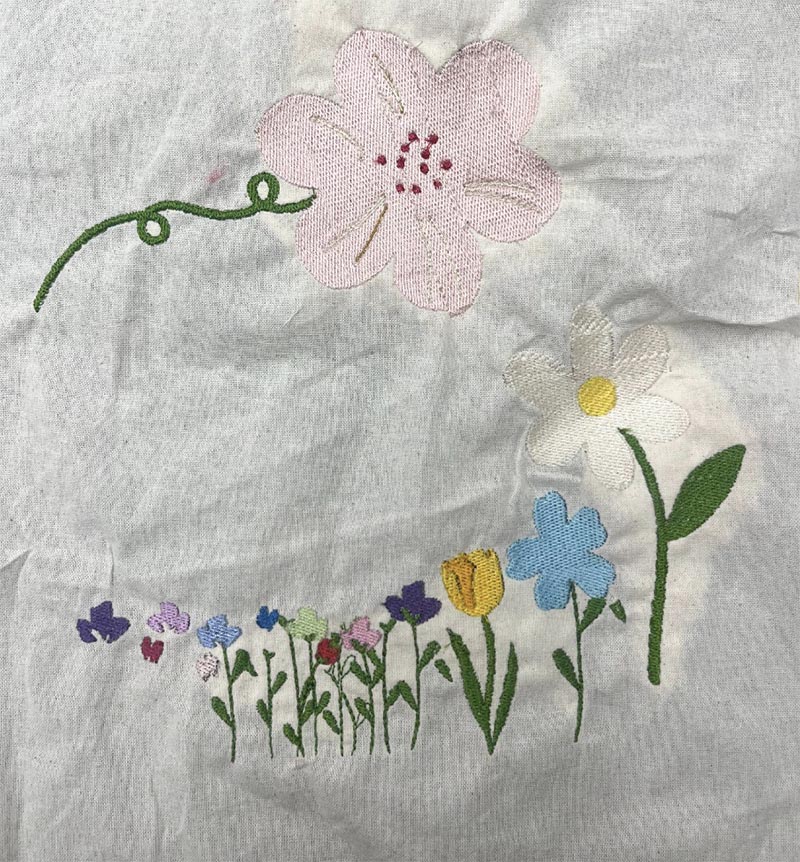
For a final project in Data Visualization with Textiles 2024, Tanvi Deshpande used Class Data to embroider flowers representing the departments she took classes in.
My embroidery project was based on the unit counts of classes I’ve taken in various departments during my six quarters at Stanford. Initially, I intended on embroidering a bundle of flowers for each quarter onto a tote bag, where a flower’s color represented the department a class was in and its size corresponded to the number of units it was. However, since I have taken classes in 14 different departments, this design quickly became more complicated than I could handle.
Hence, with Quinn’s guidance, I first translated the department and unit count of each class I’ve taken from my transcript onto a spreadsheet. Then, I created a new column with each department and the total unit count across all quarters, resulting in the following data:
| CS | 59 |
|---|---|
| ITALIC | 14 |
| MATH | 9 |
| ENGLISH | 5 |
| PWR | 4 |
| AS | 4 |
| CLASSICS | 3 |
| MSE | 3 |
| ANTHRO | 2 |
Through this process, I learned that it’s important to simplify or transform data for not just ease of implementation into a textile medium, but also so the viewer/audience of the piece can easily understand and process the data being showcased. If I had separated the classes by quarter, while more information would be conveyed, the audience might have been overwhelmed and missed the main takeaway of the piece. I also learned that it’s important to pivot the implementation of a project based on concerns that arise during the making process, but that the original vision can still be preserved.
To translate this data to textiles, I decided to embroider one flower per department onto a tote bag using the Brother PES digital embroidery machine. To do so, I first found graphics of flowers that I liked online and created 3 .png images 2 for the biggest flowers, and 1 for the rest of the flowers) representing the designs I wanted to embroider onto my tote bag. Then, using Ink/Stitch (a plugin for Inkscape), I converted these into a .pes file, which is accepted by the embroidery machine.
To do so, I first used the trace bitmap/Bezier curve tool to create vectorized versions of my designs. Then, I used the Ink/Stitch plugin to preview the embroidery process on the Brother and export the .pes designs. From here, I simply had to position the tote bag in the embroidery machine, thread it, and click “Start Embroidering!”